UPI Safety Guide: Avoiding Frauds, QR Traps, and Fake Collect Requests
Essential protection rules: why UPI PIN is NEVER needed to receive money, how to inspect recipient VPAs, and client-side safety verification.
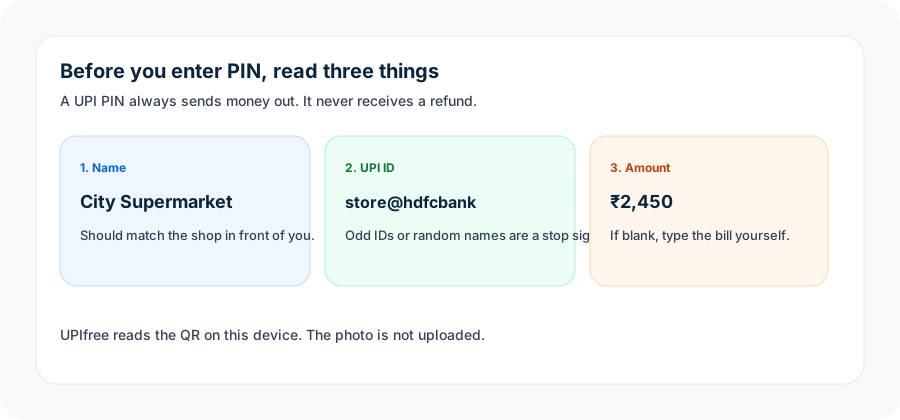
Rules of UPI safety
UPI PIN is ONLY for Debiting Money:
You NEVER need to enter your UPI PIN, password, or OTP to receive money or get a refund. If someone asks you to enter your PIN to "receive a payment", it is 100% a scam.Verify the Payee Name Before Approving:
Every authentic UPI QR or payment link contains a verified Payee Name (pn) resolved directly by the recipient's bank. Always check the displayed name on your screen before authorizing.Inspect QR Codes Before Scanning:
Use our QR Code Analyzer to inspect payment strings, check payee handles, and verify transaction parameters without initiating payments or sharing personal banking data.Never Install Remote Access Apps:
Never install screen-sharing software (such as AnyDesk, TeamViewer, QuickSupport) at the request of anyone claiming to be bank or customer support.
Share this article
Help friends, merchants, and colleagues stay informed with verified regulatory facts.
Official Government & Regulatory Citations
- NPCI UPI Safety & Security GuidelinesVerify Primary Document
Put this guide into practice with our 100% free, client-side calculation engines:
QR Code Safety Analyzer
Client-side fraud inspection: verify registered merchant VPA, MCC & safety flags.
Multi-Payer Bill Splitter
Split shared dinner or rent expenses with instant scannable UPI QR codes.